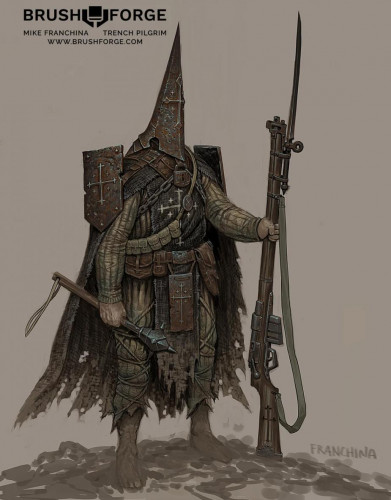
Trench Pilgrim – Narrative Design by Mike Franchina

Trench Pilgrim – Narrative Design by Mike Franchina
English | Size: 7.8GB
Category: Tutorial


n this package, you will learn the fundamentals of developing ideas into compelling visual stories. You will discover how to incorporate the four main pillars of design (story, iconic shapes, believable details, and resonance) to drive and bring your concepts to life. This course is ideal for intermediate to advanced students who are passionate about design and looking to level up their concept skills.

Hardsurface modeling a Sci-Fi Gun with HardOPS in Blender 2.8 with Dejan Pejacki

Hardsurface modeling a Sci-Fi Gun with HardOPS in Blender 2.8 with Dejan Pejacki
English | Size: 5.6GB
Category: Tutorial


This tutorial is about HardSurface Modeling in Blender 2.8. I’ll explain you my process and the tools I use showing the entire modeling of the Sci-Fi Gun almost 2 hours of work. I also share some free plugin and tricks for making hole, smooth transition…

Skillshare – Adobe Photoshop 3D Text Effect Create Gold Realistic Typography Art-SkilledHares

Skillshare – Adobe Photoshop 3D Text Effect Create Gold Realistic Typography Art-SkilledHares
English | Size: 797.28 MB
Category: Tutorial


This class is designed to teach you a variety of advanced Design techniques by creating a real world Typography text effect project with the 3D features of Photoshop, The goal is to walk you step by step and teach you how to design professional looking projects in Photoshop.

Flux Academy – The 6 Figure Freelance Designer(2020) || Ran Segall

Flux Academy – The 6 Figure Freelance Designer(2020) || Ran Segall
English | Size: 1.39 GB
Category: Tutorial


Yep, you.
You probably think that I’m just saying this. That making a great living as a freelancer is only for a few lucky ones for whom the client stars magically align.

Lynda – Creating an Interactive PDF Magazine

Lynda – Creating an Interactive PDF Magazine
English | Size: 297.8MB
Category: Tutorial


Learn to take a magazine originally designed as a static Adobe InDesign document and convert it to an interactive PDF. Of all the ways to create a digital magazine, PDF is a great choice because it fully preserves the look of your print design and requires no coding to create. Author Mike Rankin walks you through 12 quick steps to transform a print magazine into a digital one, with hyperlinks, buttons, and bookmarks for navigating to content inside the catalog and out on the web. Plus, learn to add video, slideshows, and forms that can be submitted via email. Mike also shows you how to recognize and fix some real-world problems with interactive PDFs from InDesign.